| Command Summary | Command Syntax | Calculator Compatibility | Token Size |
|---|---|---|---|
| Joins two strings together. | string&string | This command works on all calculators. | 2 bytes |
Menu Location
- Press 2nd MATH to enter the MATH popup menu.
- Press D to enter the String submenu.
- Press 4 to select &.
The & Command
The & operator joins two strings together, one after the other, returning one large string.
:"Hello"&"World"
           "HelloWorld"
:5→n
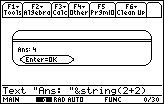
:"The value of n is "&string(n)
           "The value of n is 5"
Appending strings is very useful when you want to display text. If you want to display more than one string on the same line, for instance with the 68k:Text command, you'll need to use & to combine the strings.
By default, & doesn't put in any separation between the strings, which can look weird: you can see this in the above example, where joining "Hello" and "World" made "HelloWorld". With multiple uses of &, you can put in any separator you like:
:"Hello"&" "&"World"
           "Hello World"
If you want to use & to build up a string from scratch, start with "" — the empty string.
Related Commands
See Also
Authors: