| Command Summary | Command Syntax | Calculator Compatibility | Token Size |
|---|---|---|---|
| Enables the grid on the graph screen. | GridOn | TI-83/84/+/SE | 2 bytes |
Menu Location
Press:
1. 2nd FORMAT to access the graph format menu.
2. Use arrows and ENTER to select GridOn.
The GridOn Command
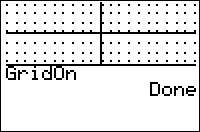
The GridOn command enables a grid on the graph screen (you can disable it again with the GridOff command). How fine or coarse the grid is depends on the Xscl and Yscl variables. Drawing the grid just involves plotting points all the points of the form (A*Xscl, B*Yscl) that are in the graphing window. The grid is often used in games such as Dots & Boxes, Tic-Tac-Toe, and 2D puzzles.
On the TI-84+CSE and TI-84+CE, an additional argument may be used to set the color of the grid:
:GridOn GRAY
Like other drawing commands, the color may be replaced by its numerical value (ranging from 10 to 24).
Advanced Uses
GridOn can be used to shade the entire screen if Xscl and Yscl are small enough that the points on the grid are one pixel apart:
:ΔX→Xscl
:ΔY→Yscl
:GridOn
This is one of the shortest ways to shade the screen, although Shade( can be used for a (usually) even shorter way. However, using GridOn is also very slow: the fastest way involves the Horizontal or the Vertical commands in a For( loop (or the BackgroundOn command for color calculators).