| Command Summary | Command Syntax | Calculator Compatibility | Token Size |
|---|---|---|---|
| Returns the maximum of two elements or of a list. | * for two numbers: max(x,y) for a list: max(list) comparing a number to each element of a list: max(x,list) or max(list,x) pairwise comparing two lists: max(list1,list2*) |
TI-83/84/+/SE | 1 byte |
Menu Location
Press:
1. MATH to access the math menu.
2. RIGHT to access the NUM submenu.
3. 7 to select max(, or use arrows.
Alternatively, press:
1. 2nd LIST to access the list menu.
2. LEFT to access the MATH submenu.
3. 2 to select max(, or use arrows.
The max( Command
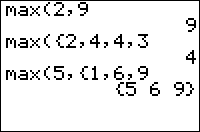
max(X,Y) returns the largest of the two numbers X and Y. max(*list*) returns the largest element of list. max(*list1*,*list2*) returns the pairwise maxima of the two lists. max(*list1*,X) (equivalently, max(X,*list1*)) returns a list whose elements are the larger of X or the corresponding element of the original list.
max(2,3)
     3
max({2,3,4})
     4
max({1,3},{4,2})
     {4 3}
max({1,3},2)
     {2 3}
Unlike comparison operators such as < and >, max( can also compare complex numbers. To do this, both arguments must be complex — either complex numbers or complex lists: max(2,*i*) will throw an error even though max(2+0*i*,*i*) won't. In the case of complex numbers, the number with the largest absolute value will be returned. When the two numbers have the same absolute value, the first one will be returned: max(*i*,-*i*) returns i and max(-*i*,*i*) returns -i.
Advanced Uses
max( can be used in Boolean comparisons to see if at least one of a list is 1 (true) — useful because commands like If or While only deal with numbers, and not lists, but comparisons like L₁=L₂ return a list of values. In general, the behavior you want varies, and you will use the min( function or the max( function accordingly.
Using max( will give you a lenient test — if any one element of the list is 1 (true), then the max( of the list is true — this is equivalent to putting an or in between every element. For example, this tests if K is equal to any of 24, 25, 26, or 34 (the getKey arrow key values):
:If max(K={24,25,26,34
:Disp "ARROW KEY
To get the element of a real list in Ans with the greatest absolute value, use imag(max(*i*Ans)) or max(abs(Ans)).
max( can be also used along with min( to constrain a value between a lower and upper number:
:max(-1,min(1,100)) // returns 1 because 1 is between -1 & 100
:max(-1,min(1,0)) // returns 0 because 1 is not between -1 & 0
where the bounds for which the number 1 must fall between are first argument of max( and the second argument of min( in the above code.
Error Conditions
- ERR:DATA TYPE is thrown when comparing a real and a complex number. This can be avoided by adding +0i to the real number (or i^4 right after it, for those who are familiar with complex numbers)
- ERR:DIM MISMATCH is thrown, when using
max(with two lists, if they have different dimensions.