| Command Summary | Command Syntax | Calculator Compatibility | Token Size |
|---|---|---|---|
| Returns the variable type of a variable | getType(variable) | This command works on all calculators. | 2 bytes |
Menu Location
N/A
The getType() Command
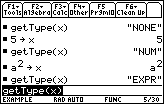
The getType() command returns the type of a variable — number, string, function, etc. The output is a short string encoding the type of the variable.
:5→x
:getType(x)
           "NUM"
:{1,2,3}→x
:getType(x)
           "LIST"
:DelVar x
:getType(x)
           "NONE"
The specific values that getType() can return are:
- "DATA" for a data variable
- "EXPR" for a symbolic expression
- "FUNC" for a function
- "LIST" for a list
- "MAT" for a matrix
- "NONE" for an undefined variable
- "NUM" for a number
- "OTH" for an unknown variable type (usually assembly-related)
- "PIC" for a picture
- "PRGM" for a program
- "STR" for a string
- "TEXT" for a text file
Keep in mind that getType() cannot test the type of an expression, only a variable — so getType("Hello!") for example is invalid.
Advanced Uses
If possible, avoid comparing the result of getType() to an actual string. The risk here is that when the calculator is switched to a different language, the output of getType() changes language too. This is only a minor consideration. But if you already have a variable of the right type lying around, and you want to test an unknown variable, compare their getTypes(). For example:
:{1,2,3}→knownlst
:If getType(unknown)="LST"

can be

:{1,2,3}→knownlst
:If getType(unknown)=getType(knownlst)
This is occasionally, but not always, a size optimization as well, if the known variable has a short name.
Since getType() returns a result even for undefined variables, it can be used as a replacement for 68k:isVar(), which unlike getType() isn't present on all 68k calculator models.
Error Conditions
140 - Argument must be a variable name happens when the argument is not a variable name.