| Command Summary | Command Syntax | Calculator Compatibility | Token Size |
|---|---|---|---|
| Takes a symbolic derivative of an expression. | d(expression,variable[,order]) | This command works on all calculators. | 2 bytes |
Menu Location
- Press 2nd MATH to enter the MATH popup menu.
- Press B to enter the Calculus submenu.
- Press 1 to select d(.
The d() Command
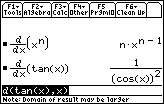
The *d*() command takes the derivative of an expression with respect to a given variable. All other variables are treated as constant.
Optionally, you can give it a third argument (an integer), and take the derivative that many times. If the argument is negative, it will actually integrate.
:d(x^2,x)
           2*x
:d(x^5,x,4)
           120*x
:d(x^2+y^2+2*x*y,x)
           2*x+2*y
Related Commands
Authors: