| Command Summary | Command Syntax | Calculator Compatibility | Token Size |
|---|---|---|---|
| Graphs two functions and shades the area between them. | Shade(lower func, upper func, [xmin, xmax, pattern #, resolution]) | TI-83/84/+/SE | 1 byte |
Menu Location
Press:
1. 2nd DRAW to access the draw menu.
2. 7 to select Shade(, or use arrows.
The Shade( Command
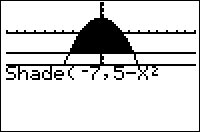
The Shade( command draws two functions and shades the area between them.
Shade(lower func, upper func, [xmin, xmax, pattern #, resolution])
- lowerfunc and upperfunc are the two functions (whenever lowerfunc<upperfunc, the area between them will be shaded)
- xmin and xmax (optional) are left and right boundaries on where to shade.
- pattern # (optional) is an integer 1-4 determining which pattern to use:
- 1 — vertical shading (default)
- 2 — horizontal shading
- 3 — diagonal shading (negative slope)
- 4 — diagonal shading (positive slope)
- resolution (optional) is an integer 1-8 determining the spacing between shading lines. When it's 1 (default), everything is shaded, when it's 2, one pixel is skipped between lines, and so on - when it's 8, seven pixels are skipped.
Note that if you don't supply the resolution argument, it defaults to 1 and everything gets shaded regardless of the pattern.
Advanced Uses
Shade(Ymin,Ymax) is the smallest (though not the fastest) way to shade the entire screen.
Related Commands
See Also
Authors: