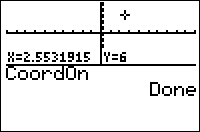
| Command Summary | Command Syntax | Calculator Compatibility | Token Size |
|---|---|---|---|
| Turns on the cursor coordinate display on the graph screen. | CoordOn | TI-83/84/+/SE | 2 bytes |
Menu Location
Press:
1. 2nd FORMAT to access the graph format menu
2. Use arrows and ENTER to select CoordOn
The CoordOn Command
When moving a cursor on a screen, it's possible for the calculator to display the coordinates of the current point (either polar or rectangular coordinates, depending on which of RectGC or PolarGC is set). The CoordOn command turns on this option (to disable it, use the CoordOff command).
The coordinates are displayed in practically every situation when you're moving a cursor on the graph screen, even including the Trace, Input or Select( commands in a program. The interactive mode of Text( and the Pen tool are the exceptions — this is because these two situations involve a pixel coordinate, and not a point.
Related Commands
Authors: