| Command Summary | Command Syntax | Calculator Compatibility | Token Size |
|---|---|---|---|
| Tests if one value is smaller than another. | value1<value 2 | This command works on all calculators. | 1 byte |
Menu Location
Press [2nd][<] to enter <.
The < Command
The < operator compares two values, returning true if the right side is greater, and false otherwise. It is a basic building block of the conditions used by commands such as 68k:If, 68k:when(), and 68k:While. The results of < and the other relational operators (=, ≠, >, ≥, and ≤) can be combined with the 68k:and, 68k:or, 68k:xor, and 68k:not operators to create more complicated conditions.
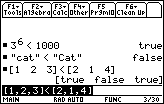
It returns a single value for most types of data, and returns false if the two sides are mismatched in type: comparing a single number to a list, for instance, or comparing two lists that are of a different size. The only exception is when comparing two 68k:lists or two 68k:matrices of the same size: in that case, it compares them element-by-element, and returns a list or matrix of true/false values.
:3<4
           true
:3<2
           false
:{1,2,3}<{3,2,1}
           {true  false  false}
If either side or both contains undefined variables, < will wait to return a value. You can do math with the resulting inequality, and if an operation makes sense, it will be applied to both sides: for instance, if x
Advanced Uses
The < operator can also compare strings. It does so by comparing the 68k:character codes of each character, and orders the strings by the first difference it finds. This ideally means that the strings are ordered by dictionary order: for example, "aardvark"<"apple", since it would come later in the dictionary.
However, the problem is that all uppercase letters have a smaller character code than lowercase letters, so this only holds true if the strings are the same case. Otherwise, strange results can happen: for instance, "Apple"<"aardvark", since "A" comes before "a".