| Command Summary | Command Syntax | Calculator Compatibility | Token Size |
|---|---|---|---|
| Turns off the clock display in the mode screen. | ClockOff | TI-84+/SE | 2 bytes |
Menu Location
This command can only be found in the catalog. Press:
1. 2nd CATALOG to enter the command catalog
2. C to skip to command starting with C
3. Scroll down to ClockOff and select it
The ClockOff Command
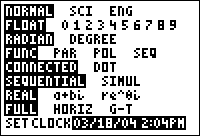
The ClockOff command turns off the clock display at the bottom of the mode screen on the TI-84+/SE calculators. You can turn the clock back on by using the ClockOn command, or by selecting 'TURN CLOCK ON' ,displayed in place of the clock on the mode screen.
The ClockOff command does not actually turn the clock off. The time can still be accessed through use of the getTime and getDate commands, and all their cousins.
Related Commands
Authors: