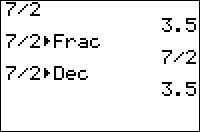
| Command Summary | Command Syntax | Calculator Compatibility | Token Size |
|---|---|---|---|
| Displays the fractional value of a number | Decimal►Frac | TI-83/84/+/SE/CE | 1 byte |
Menu Location
While editing a program, press:
1. MATH to open the math menu
2. ENTER or 1 to select.
The ►Frac Command
►Frac attempts to display the input in fraction form. It only works on the home screen outside a program, or with the Disp and Pause commands in a program. It takes up to 12 decimal places of a non-terminating decimal to find the corresponding fraction. The decimal input is returned if ►Frac fails to find the fraction form.
For a more versatile algorithm for finding fractions, see the Decimal to Fraction routine.
.333►Frac
        .333
.333333333333►Frac
         1/3
Related Commands
See Also
Authors: