| Command Summary | Command Syntax | Calculator Compatibility | Token Size |
|---|---|---|---|
| Allows the user to select a subinterval of any enabled Scatter or xyLine plots. | Select(x-list name, y-list name) | TI-83/84/+/SE | 2 bytes |
Menu Location
Press:
1. 2nd LIST to access the list menu.
2. RIGHT to access the OPS submenu.
3. 8 to select Select(, or use arrows and ENTER.
The Select( Command
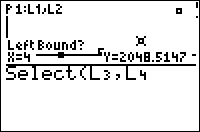
When Select( is called, if it has any Scatter or xyLine plots to work with, it displays the graph screen and allows the user to pick a left bound and then a right bound on one of the plots (the left and right keys move from point to point, while the up and down keys switch plots). Then, it stores all the points between those bounds to x-list name and y-list name. Finally, it sets the chosen plot to use x-list name and y-list name as its X and Y lists.
Optimization
It isn't necessary to add the ∟ symbol before list names:
:Select(∟X,∟Y)
can be
:Select(X,Y)
Error Conditions
- ERR:INVALID is thrown if there are no enabled Scatter or xyLine plots for the command to work with.
Related Commands
Authors: