| Command Summary | Command Syntax | Calculator Compatibility | Token Size |
|---|---|---|---|
| Formats a complex value in polar form when displaying it. | value►Polar | TI-83/84/+/SE | 2 bytes |
Menu Location
Press:
1. MATH to access the math menu.
2. RIGHT RIGHT to access the CPX submenu.
3. 7 to select ►Polar, or use arrows and ENTER.
The ►Polar Command
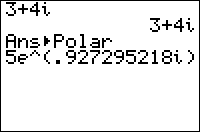
The ►Polar command can be used when displaying a complex number on the home screen, or with the Disp and Pause commands. It will then format the number as though re^θi mode were enabled. It also works with lists.
i
    i
i►Polar
    1e^(1.570796327i)
{1,i}►Polar
    {1 1e^(1.570796327i)}
It will also work when displaying a number by putting it on the last line of a program by itself. It does not work with Output(, Text(, or any other more complicated display commands.
To actually separate a number into the components of polar form, use abs( and angle(.
Error Conditions
- ERR:SYNTAX is thrown if the command is used somewhere other than the allowed display commands.
- ERR:DATA TYPE is thrown if the value is real.
Related Commands
Authors: