| Command Summary | Command Syntax | Calculator Compatibility | Token Size |
|---|---|---|---|
| Returns the size of a list, matrix, or string. | dim(list-matrix-or-string) | This command works on all calculators. | 1 byte |
Menu Location
- Press 2nd MATH to enter the MATH menu.
- Press D to enter the String submenu.
- Press 3 to select dim(.
The dim() Command
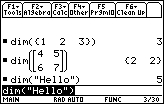
The dim() command returns the size of a list, matrix, or string:
- The number of elements for a list.
- The number of characters for a string.
- A list of {number of rows or columns} for a matrix.
This command is critical to using any of these objects, for instance, if you want to write a 68k:For..EndFor loop to look at every element.
However, unlike the TI-83 series version, you can't use the dim() command to change the size of anything. Use 68k:mid() to get a smaller list or string (68k:subMat() for a matrix), or use 68k:newList() and 68k:newMat() to create a list or matrix of a specific size.
:dim({1,2,3,4,5}
           5
:dim("TI-Basic Developer")
           18
:dim([1,2,3;4,5,6])
           {2  3}
Optimization
For matrices, using 68k:rowDim() and 68k:colDim() is usually better in all practical situations, and you don't have to remember which number goes first.