| Command Summary | Command Syntax | Calculator Compatibility | Token Size |
|---|---|---|---|
| Indicates the beginning of a custom list. | ∟LISTNAME | TI-83/84/+/SE | 1 byte |
Menu Location
While editing a program, press:
1. 2nd LIST to access the List menu
2. RIGHT to access the OPS submenu
3. 2nd B to select ∟, or use arrows
The ∟ Command
The ∟ character is used at the start of the name of any custom list you create, for example:
{1,2,3}→∟HELLO
{4,5,6}→∟WORLD
In most cases you need to include this when accessing or manipulating a custom list (although there's a few exceptions, see the Optimization section below). You do not need this character when accessing the the default lists L₁...L₆).
The maximum length of the list name (not including the ∟) is five letters. ∟ABCDE works, but ∟ABCDEF does not. List names must start with a letter A-Z but can also include numbers so ∟LIST1 and ∟LIST2 are valid list names, but ∟123 is not.
There are two ways to insert this character:
- Press
2nd,LIST, press right arrow to access theOPSmenu, scroll to the bottom, and pressENTERto insert the∟character. You can then type the rest of the name of your list. - If your custom list already exists, you can press
2nd,LIST, select the name of your list, and pressENTER. The whole name including the∟character will be inserted.
Optimization
You don't actually need to include the ∟ command when storing (→) to a list.
{1,2,3}→HELLO
{4,5,6}→WORLD
{7,8,9}→X
Although the name X as used above also matches the name of a regular real variable, since the data being stored is a list, it will be saved to ∟X.
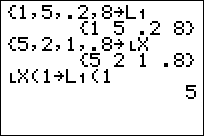
When storing to a specific list item, you MUST still include the ∟ character:
1→∟HELLO(1)
2→∟WORLD(2)
3→∟X(3)
Some of the list commands also allow for leaving off the ∟ character, such as SetUpEditor. However, be careful when doing so with Input and Prompt because you might only be asking the user to input a list, but if a real value is entered, it would be saved to a real variable instead.
Error Conditions
- ERR:SYNTAX is thrown if you try to reference/create a list with more than 5 characters in its name.
- ERR:UNDEFINED is thrown if you try to use ∟ on an undefined list.
Related Commands
- → (store)