| Command Summary | Command Syntax | Calculator Compatibility | Token Size |
|---|---|---|---|
| If the calculator is in degree mode, the r (radian) symbol converts a radian angle to degrees. | angler | TI-83/84/+/SE | 1 byte |
Menu Location
Press:
1. 2nd ANGLE to access the angle menu.
2. 3 to select r, or use arrows and ENTER.
The r (Radian Symbol) Command
| NOTE: Due to the limitations of the wiki markup language, the r command on this page does not appear as it would on the calculator. See Wiki Markup Limitations for more information. |
|---|
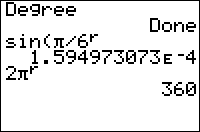
Normally, when the calculator is in degree mode, the trigonometric functions only return values calculated in degrees. With the r symbol you can have the angle evaluated as if in radian mode because it converts the angle into degrees.
One full rotation around a circle is 2π radians, which is equal to 360°. To convert an angle in radians to degrees you multiply by 180/π, and to convert from degrees to radians multiply by π/180.
In degree mode:
sin(π)      \\sine of Pi degrees
    .0548036651
sin(π^^r)
    0
In radian mode:
sin(π)
    0
sin(π^^r)
    0       \\There's no difference when in radians
Optimization
When you only call the trig function once in a program and want it calculated in radians, instead of changing the mode you can just use ° to save one-byte (the newline from using the command Radian)
:Radian
:sin(X)
can be
:sin(X^^r)
Related Commands
°(degree symbol)
Authors: