| Command Summary | Command Syntax | Calculator Compatibility | Token Size |
|---|---|---|---|
| Sets the dimension of a list or lists to 0. | ClrList list1, [list2, list3, ...] | TI-83/84/+/SE | 1 byte |
Menu Location
Press:
1. STAT to access the statistics menu
2. 4 to select ClrList, or use arrows.
The ClrList Command
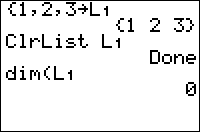
ClrList sets the length of a list (or several lists) to 0. This is virtually equivalent to deleting the list, except for several differences:
- The list still exists — it will be shown in the memory management menu and the list menu
- Calling the
dim(command on it will return 0, rather than an error. ClrListcan clear multiple lists at the same time
Advanced Uses
You might use ClrList when building up a list element by element and using dim( in the process:
:ClrList L1
:While 10>dim(L1
:Input X
:X→L1(1+dim(L1
:End
Optimization
Using DelVar instead of ClrList allows you to save a tiny bit of memory (between 12 and 16 bytes) that ClrList doesn't delete, while keeping almost every aspect of the list clearing the same. If you are clearing several lists, you can separate them with commas as the arguments to ClrList, which can save space. Using ClrList is also substantially faster than DelVar if the list is going to be cleared many times.
Error Conditions
- ERR:SYNTAX is thrown if you leave off the ∟ symbol when referring to a custom list (i.e.,
ClrListB will not work; you have to useClrList∟B).
Related Commands
Authors: