| Command Summary | Command Syntax | Calculator Compatibility | Token Size |
|---|---|---|---|
| Computes the (principal branch of the) base 10 logarithm. | log(value) log(value,base) (OS 2.53MP) |
TI-83/84/+/SE | 1 byte |
Menu Location
Press the LOG key to paste log(.
The log( Command
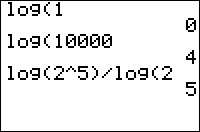
The log( command computes the base 10 logarithm of a value — the exponent to which 10 must be raised, to get that value. This makes it the inverse of the 10^( command.
log( is a real number for all positive real values. For negative numbers, log( is an imaginary number (so taking log( of a negative number will cause ERR:NONREAL ANS to be thrown in Real mode), and of course it's a complex number for complex values. log( is not defined at 0, even if you're in a complex mode.
Advanced Uses
Using either the ln( or the log( command, logarithms of any base can be calculated, using the identity:
\(\(\log_b{x} = \frac{\ln{x}}{\ln{b}} = \frac{\log{x}}{\log{b}}\)\)
So, to take the base B log of a number X, you could use either of the following equivalent ways:
:log(X)/log(B)
:ln(X)/ln(B)
This is the exponent to which B must be raised, to get X. If using OS 2.53 MP or higher, this formula can be circumvented entirely with an optional second argument:
:log(X,B)
This form is functionally identical to the logBASE command with the same arguments available with the same OS, but unlike its counterpart does not have any special visual rendering when in MATHPRINT mode. Both logBASE and the second argument of log( are disabled in exam mode.
The base 10 logarithm specifically can also be used to calculate the number of digits a whole number has:
:1+int(log(N))
This will return the number of digits N has, if N is a whole number. If N is a decimal, it will ignore the decimal digits of N.
Error Conditions
- ERR:ARGUMENT when attempting to use the second argument of
log(in exam mode. - ERR:DOMAIN when calculating
log(0). - ERR:NONREAL ANS if taking
log(of a negative number inRealmode.