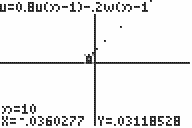
| Command Summary | Command Syntax | Calculator Compatibility | Token Size |
|---|---|---|---|
| Sets the u and w sequence equations to be graphed against each other. | uwAxes | TI-83/84/+/SE | 2 bytes |
Menu Location
When Seq mode is enabled, press:
1. 2nd FORMAT to access the format menu.
2. Use arrows to select uwAxes.
The uwAxes Command
When uwAxes is enabled, and the calculator is in Seq mode, the equations u and w will be graphed against each other (that is, the points (u(n),w(n)) are graphed for the values of n between nMin and nMax). With this setting, sequence mode graphs are a bit like parametric mode, except the parameter n is always an integer, and recursive definitions are possible.
The equation v is ignored when in uwAxes mode.
See "Related Commands" for other possibilities of graphing sequences.
Error Conditions
- ERR:INVALID is thrown if either u or w is undefined.
Related Commands
Authors: