| Command Summary | Command Syntax | Calculator Compatibility | Token Size |
|---|---|---|---|
| Output is used to display text to pixel coordinates on the Program I/O screen. | Output row,col,text | This command works on all calculators. | 2 bytes |
Menu Location
Starting in the program editor:
- Press F3 to enter the I/O menu.
- Press 6 to paste Output.
The Output Command
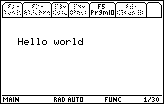
The Output command is the most basic command for displaying text. It can display any type of expression on the Program I/O screen in the large font, using "Pretty Print" if it is enabled. It uses (row, column) pixel coordinates to determine the top left corner from which it displays the expression. By far the most common use of Output is for displaying strings.
:Output 20,20,"Hello, world"
Advanced Uses
Both the row and the column coordinates for displaying text can be arbitrary integers — they can be negative, and they can go off-screen. The portion of the text that fits on the screen (if any) is drawn, and the rest is omitted: there is no wrapping of any kind.
Related Commands
Authors: