| Command Summary | Command Syntax | Calculator Compatibility | Token Size |
|---|---|---|---|
| Reverses a condition. Can also be used as a bitwise "not" on integers. |
not condition not integer |
This command works on all calculators. | 1 byte |
Menu Location
- Press 2nd MATH to enter the MATH popup menu.
- Press 8 to enter the Test submenu.
- Press 7 to select not.
The not (~) Command
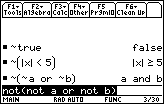
The "not" operator reverses a condition, making it true if it had been false, and false if it had been true. You can create these conditions with the relational operators =, ≠, >, ≥, <, and ≤, with functions such as 68k:isPrime(), 68k:pxlTest(), and 68k:ptTest(), or with any other expression that returns 'true' or 'false'. Other operators for dealing with conditions are 68k:and, 68k:or, and 68k:xor.
In output, it can also appear as ~, and if you type the ~ character, it will be interpreted as "not".
:not 2+2=4
           false
:not x
           ~x
The operator can also be applied to an integer, treating it as a 32-bit signed integer (larger integers will be truncated to fit) expressed in binary. In this case, it gives the 1's complement, flipping all the bits.
:(not 0b1111)▶Bin
           0b11111111111111111111111111110000
:not 1000
           -1001
Error Conditions
60 - Argument must be a Boolean expression or integer happens when the data type is incorrect.