| Command Summary | Command Syntax | Calculator Compatibility | Token Size |
|---|---|---|---|
| Stores a value in a variable. | Define variable=value | This command works on all calculators. | 2 bytes |
Menu Location
Starting in the program editor:
- Press F4 to enter the Var menu.
- Press 1 or Enter to select Define.
The Define Command
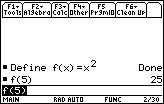
The Define command sets the value of a variable. At its simplest, it's an alternative to →: Define x=5 is equivalent to 5→x. However, Define is also useful for defining functions or programs using 68k:Func..EndFunc or 68k:Prgm..EndPrgm respectively, which → can't do:
:Define key()=Func
: Local k
: Loop
:  getKey()→k
:  If k≠0
:   Return k
: EndLoop
:EndFunc
Advanced Uses
Using Define to create functions or programs is very useful when inside a program. If your program uses its own subroutines to perform simple tasks (such as the key-reading program above), you can define these subroutines inside the program itself, keeping everything in one file (it might be good to make them 68k:Local or use 68k:DelVar to delete them afterwards). Subroutines are useful for organizing a large program.
Error Conditions
190 - Circular definition happens when defining a variable (other than a recursive function or program) in terms of itself.