| Command Summary | Command Syntax | Calculator Compatibility | Token Size |
|---|---|---|---|
| Puts the calculator into a+bi mode. | a+bi | TI-83/84/+/SE | 1 byte |
Menu Location
Press:
1. MODE to access the mode menu.
2. Use the arrow keys and ENTER to select a+bi
The a+bi Command
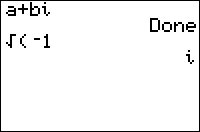
The a+b*i* command puts the calculator into rectangular complex number mode. This means that:
- Taking square roots of negative numbers, and similar operations, no longer returns an error.
- Complex results are displayed in the form a+b*i* (hence the name of the command)
This is the standard way of displaying complex numbers, though they can also be displayed in polar form (see re^θi for more details). To extract the coefficients a and b, use the real( and imag( commands.
Advanced Uses
Rather than switch to a+bi mode, you might want to force the calculations to use complex numbers by making the original argument complex. The general way to do this is by adding +0i to the number. However, there may be an optimization in any particular case. See the quadratic formula routine for a good example of this.
Real
        Done
√(-1)
        (causes an error)
√(-1+0i)
        i