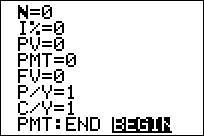
| Command Summary | Command Syntax | Calculator Compatibility | Token Size |
|---|---|---|---|
| Sets the TVM solver to use payments at the beginning of a period. | Pmt_Bgn | TI-83/84/+/SE | 2 bytes |
Menu Location
On the TI-83, press:
1. 2nd FINANCE to access the finance menu.
2. ALPHA F to select Pmt_Bgn, or use arrows and ENTER.
On the TI-83+ or higher, press:
1. APPS to access the applications menu.
2. ENTER to select Finance...
3. ALPHA F to select Pmt_Bgn, or use arrows and ENTER.
The Pmt_Bgn Command
The Pmt_Bgn and Pmt_End commands toggle a setting with the finance solver. In Pmt_Bgn mode, the calculator assumes that the payments are made at the beginning of each time period, rather than at the end.
Make sure to set the calculator to one of the modes before using the finance solving commands in a program, since otherwise the result is unpredictable.
Related Commands
Authors: