| Command Summary | Command Syntax | Calculator Compatibility | Token Size |
|---|---|---|---|
| Draws a circle. | Circle(X,Y,r) (83+ and higher only) Circle(X,Y,r,{i}) (84+ CSE only) Circle(X,Y,r |
TI-83/84/+/SE/CSE/CE | 1 byte |
Menu Location
Press:
1. Press [2ND] [PRGM] to enter the DRAW menu
2. Press [9] to insert Circle(
The Circle( Command
Circle(*X*,*Y*,*r*) will draw a circle at (X,Y) with radius r. X and Y will be affected by the window settings. The radius will also be affected by the window settings.
:Circle(5,5,5)
Advanced Uses
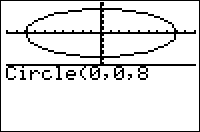
The radius of a circle is affected by the window settings. This means that if the x- and y-increment is two, the radius will be two pixels. However, there is another way to take advantage of this to draw ellipses. If the x- and y-increment are different, then the shape will not be a circle. For instance, with Xmin=0, Xmax=20, Ymin=0, and Ymax=31, Circle(10,10,2) will draw an ellipse, where the width is greater than the height.
Optimization
If a complex list such as {i} is passed to Circle( as the fourth argument, the "fast circle" routine is used instead, which uses the symmetries of the circle to only do 1/8 of the trig calculations. For example:
:Circle(0,0,5
can be
:Circle(0,0,5,{i
Any list of complex numbers will work as the fourth argument in the same way, but there's no benefit to using any other list.
Note: The "fast circle" routine is not available on the TI-84+CSE or TI-84+CE calculators.
Command Timings
The ordinary Circle( is extremely slow. The fast circle trick discussed above cuts the time down to only about 30% of the "slow Circle(" time! While still not instant, this is faster than any replacement routine that can be written in TI-Basic.
For small radii, replace Circle( with Pt-On( instead.