| Command Summary | Command Syntax | Calculator Compatibility | Token Size |
|---|---|---|---|
| Calculates several summary statistics for a list. | OneVar list[,freq,arg3,arg4] | This command works on all calculators. | 3 bytes |
Menu Location
- Press 2nd MATH to enter the MATH popup menu.
- Press 6 to enter the Statistics submenu.
- Press 1 to select OneVar.
The OneVar Command
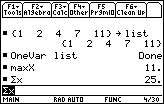
The OneVar command generates some summary statistics for a list. In its simplest form, it takes one argument — a list variable to analyze (it won't work with a list expression). It will store results to the following 68k:system variables:
- \(\bar{x}\) — the average, as given by 68k:mean()
- Σx — the sum, as given by 68k:sum()
- Σx2 — the sum of squares
- Sx — the sample standard deviation, as given by 68k:stdDev()
- σx — the population standard deviation, as given by 68k:stDevPop()
- nStat — the length of the list, as given by 68k:dim()
- minX — the smallest element, as given by 68k:min()
- q1 — the first quartile
- medStat — the median, as given by 68k:median()
- q3 — the third quartile
- maxX — the largest element, as given by 68k:max()
It won't actually display any of these results without prompting (although you could check the variables to find out their values). To display all of these statistics, use the 68k:ShowStat command.
Advanced Uses
The OneVar command takes up to 4 list arguments. The second argument, if present, is a list of frequencies. This must be the same length as the first list, and if it's there, its Nth element indicates how many times the Nth element of the first list should be counted. The calculator has no problems accepting zero or fractional numbers as frequencies.
The third and fourth arguments don't actually have an application. Their intention is to divide the elements into several categories: the third list would indicate which category each element of the data list falls under, and the fourth list would be a list of categories. However, this was apparently never implemented, and adding these lists doesn't affect the output.
Error Conditions
230 - Dimension happens when either the data list is {}, or the frequency list only contains 0s.
240 - Dimension mismatch happens when the frequency list (or the category list) isn't the same length as the data list.
260 - Domain happens when the frequency list contains negative elements.