| Command Summary | Command Syntax | Calculator Compatibility | Token Size |
|---|---|---|---|
| Returns the sine of a real number. | sin(angle) | TI-83/84/+/SE | 1 byte |
Menu Location
Press the SIN key to paste sin(.
The sin( Command
NOTE: Due to the limitations of the wiki markup language, the r command on this page does not appear as it would on the calculator. See Wiki Markup Limitations for more information.
sin(θ) returns the sine of θ, which is defined as the y-value of the point of intersection of the unit circle and a line containing the origin that makes an angle θ with the positive x-axis
The value returned depends on whether the calculator is in Radian or Degree mode. A full rotation around a circle is 2π radians, which is equal to 360°. The conversion from radians to degrees is angle180/π and from degrees to radians is angleπ/180. The sin( command also works on a list of real numbers.
In radians:
sin(π/6)
    .5
In degrees:
sin(30)
    .5
Advanced Uses
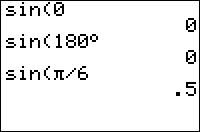
You can bypass the mode setting by using the ° (degree) and r (radian) symbols. These next two commands will return the same values no matter if your calculator is in degrees or radians:
sin(30°)
    .5
sin(π/6ֿ¹)
    .5
Error Conditions
- ERR:DATA TYPE is thrown if you supply a matrix or a complex argument.
- ERR:DOMAIN is thrown if you supply an input ≥1E12.