| Command Summary | Command Syntax | Calculator Compatibility | Token Size |
|---|---|---|---|
| Draws a horizontal line on the graph screen. | Horizontal Y | TI-83/84/+/SE | 1 byte |
Menu Location
In the program editor:
1. 2nd DRAW to enter the draw menu
2. 3 to insert the Horizontal command, or use arrows and ENTER.
The Horizontal Command
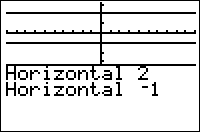
Horizontal Y draws a vertical line from the left of the graph screen to the right at Y. Horizontal is usually only used to replace a line that stretches the entire length of the graph screen, along with its counterpart Vertical.
Horizontal is affected by the window settings, unlike the Pxl- commands.
:Horizontal 5
Advanced Uses
One of the fastest ways to make the entire screen black is by drawing horizontal lines from the bottom of the screen to the top.
:For(A,Ymin,Ymax,ΔY
:Horizontal A
:End
If working with TI 84+C version calculators, the Horizontal command takes an additional color argument, as shown below:
Horizontal 5,GRAY
Related Commands
Authors: