| Command Summary | Command Syntax | Calculator Compatibility | Token Size |
|---|---|---|---|
| The mathematical symbol i, short for √(-1). | i To enter a complex number: real-part+imag-part i |
TI-83/84/+/SE/CSE/CE | 1 byte |
Menu Location
Press 2nd i to paste i.
The i Command
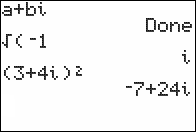
The i symbol is short for √(-1), and is used for complex numbers in algebra and complex analysis. On the calculator, entering i will not cause an error, even in Real mode, but operations that result in a complex number (such as taking the square root of a negative number) will. If you're dealing with complex numbers, then, it's best to switch to a+bi or re^θi mode.
Advanced Uses
By using i in a calculation, the calculator switches to complex number mode to do it, even if in Real mode. So √(-1) will throw an ERR:NONREAL ANS, but √(0i-1) will not (even though it's the same number). This can be used to force calculations to be done using complex numbers regardless of the mode setting — usually by adding or subtracting 0i, although more clever ways can be found.
A good example of this technique is our Quadratic Formula routine.