| Command Summary | Command Syntax | Calculator Compatibility | Token Size |
|---|---|---|---|
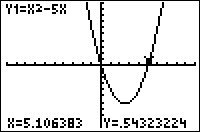
| Displays the graph screen and allows the user to trace the currently-graphed equations and plots. | Trace | TI-83/84/+/SE | 1 byte |
Menu Location
While editing a program, press the TRACE key.
The Trace Command
The Trace command displays the graph screen, and allows the user to trace any graphed equations or plots. It works in almost exactly the same way as pressing TRACE does outside a program. When the user presses ENTER, control returns to the program.
When tracing, ExprOn and ExprOff affect how the currently-traced equation is displayed, and CoordOn and CoordOff affect whether the coordinates of the cursor are displayed (RectGC and PolarGC determine the type of coordinates).
Since the ENTER key is already used for exiting, the Trace command lacks some of the functionality of pressing TRACE outside a program, where you can use ENTER to center the graphing window on the cursor. The independent variables X, T, θ, and n cannot by directly typed in, either - they can only be selected with the arrow buttons.
Advanced Uses
As a side effect, the coordinates of the last point traced are stored to X and Y (as well as R and θ, if you're in PolarGC mode, and T, θ and n depending on the graphing mode). Also, the window bounds may change if the user traces an equation past the edge of the screen.
Error Conditions
- ERR:INVALID is thrown if this command is used outside a program.