| Command Summary | Command Syntax | Calculator Compatibility | Token Size |
|---|---|---|---|
| Formats a displayed number as a degree-minute-second angle. | value►DMS | TI-83/84/+/SE | 1 byte |
Menu Location
Press:
1. 2nd ANGLE to access the angle menu.
2. 4 to select ►DMS, or use arrows and ENTER.
The ►DMS Command
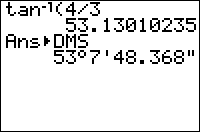
The ►DMS command can be used when displaying a real number on the home screen, or with the Disp and Pause commands. It will then format the number as an angle with degree, minute, and second parts.
30►DMS
    30°0'0"
100/9°►DMS
    11°6'40"
It will also work when displaying a number by putting it on the last line of a program by itself. It does not work with Output(, Text(, or any other more complicated display commands.
Although ►DMS is meant as a way to format angles in Degree mode, it doesn't depend on the angle mode chosen, only on the number itself. Note that entering a number as degree°minute'second" will also work, in any mode, and it will not be converted to radians in Radian mode.
Rounding to Nearest Second
If you'd prefer to not have seconds with decimal places, you can round your answer to the nearest second with the following formula:
round(Ans*3600,0)/3600►DMS
Or a slightly shorter version:
round(Ans36,2)/36►DMS
Tip: If you find yourself needing this formula regularly, put it into a Y= graphing-function as:
Y1=round(X36,2)/36
And then you can call it from your home screen via:
Y1(123.45678►DMS
Error Conditions
- ERR:SYNTAX is thrown if the command is used somewhere other than the allowed display commands.
- ERR:DATA TYPE is thrown if the value is complex, or if given a list or matrix as argument.
Related Commands
- ° (Degree Symbol) Command (includes info on inserting degrees, minutes and seconds)
►Dec►Frac►Polar►Rect