| Command Summary | Command Syntax | Calculator Compatibility | Token Size |
|---|---|---|---|
| Returns the time format of the clock on the TI-84+/SE/CE. | getTmFmt→Variable | TI-84+/SE/CE | 2 bytes |
Menu Location
This command can only be found in the catalog. Press:
1. 2nd CATALOG to enter the command catalog
2. g to skip to commands starting with G
3. Scroll down to getTmFmt( and select it
The getTmFmt Command
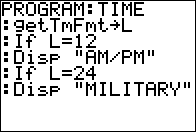
The getTmFmt( command returns the current time format of the clock on the TI-84+/SE/CE calculators as an integer. There are two different time formats available: 12 (12 hour) and 24 (24 hours). You can store this value to a variable for later use. Of course, this command only works if the time format has actually been set, so you should use the setTmFmt( command before using it.
Related Commands
Authors: